
For everyoneFans, parents & coaches
No account, no app, no refreshing. Open the link and it updates on its own every few seconds.
- Open the tournament. Go to wardsportsmedia.com/matward and tap your event, or use the link the host shared. Events happening now show a green ● Live tag.
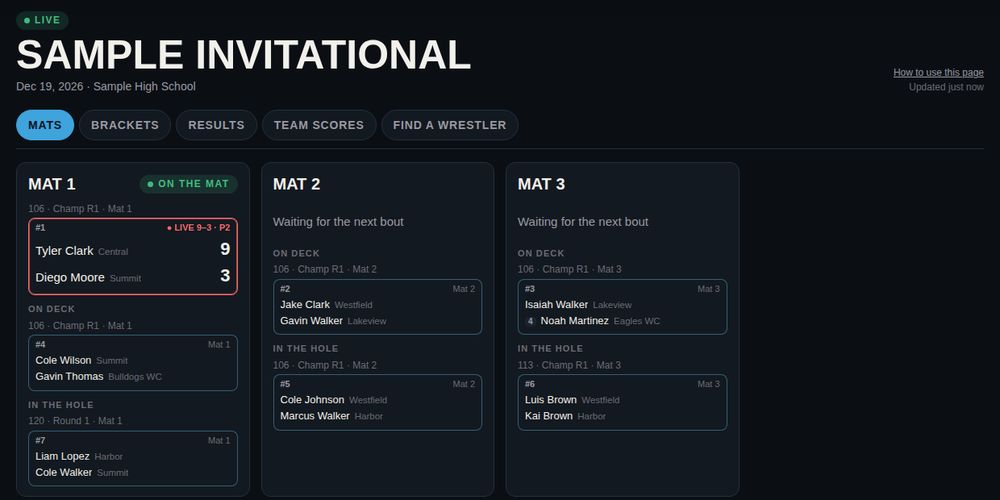
- Mats shows what's happening right now on every mat: the bout on the mat with its ● LIVE score and period, the one on deck and the one in the hole, plus the last result.
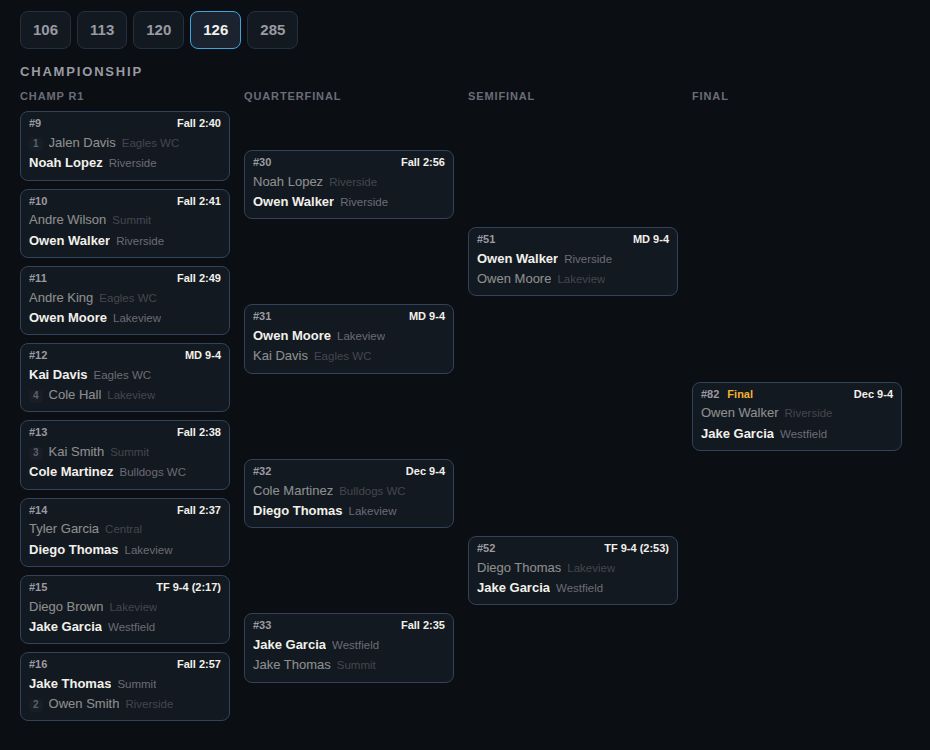
- Brackets: pick a weight to see the whole bracket — championship, consolation and placement bouts. Each box shows the bout number and mat, and the result once it's done.
- Find a wrestler: type a name or team. You'll see every match they've wrestled, the next bout number and mat, and their final place.
- Results is a running feed of every finished match, newest first. Team scores updates with every result.
For the scorer's tableMat scorers
You keep the score on your phone and it shows on the live page as you go. When the bout ends you save the result, and brackets and team scores update right away.
Sign in
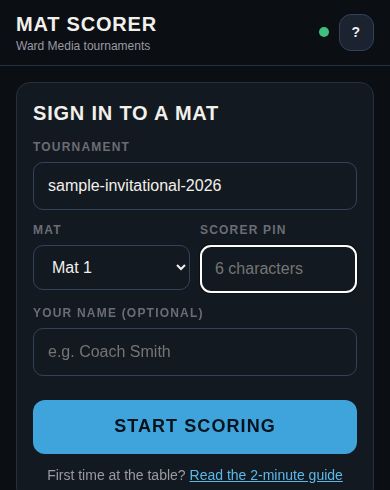
- Open the mat scorer link from the director. The tournament name is already filled in.
- Pick your mat, type the scorer PIN (capital or lowercase both work) and, if you like, your name.
- Tap Start scoring. Your phone remembers you, so you won't need the PIN again unless the director changes it.
Score a bout
- Up next on this mat lists the bouts ready for your mat, in bout-number order. Tap Start on the bout that's walking out. The live page shows it On the mat right away. Bouts still waiting on earlier results are greyed out.
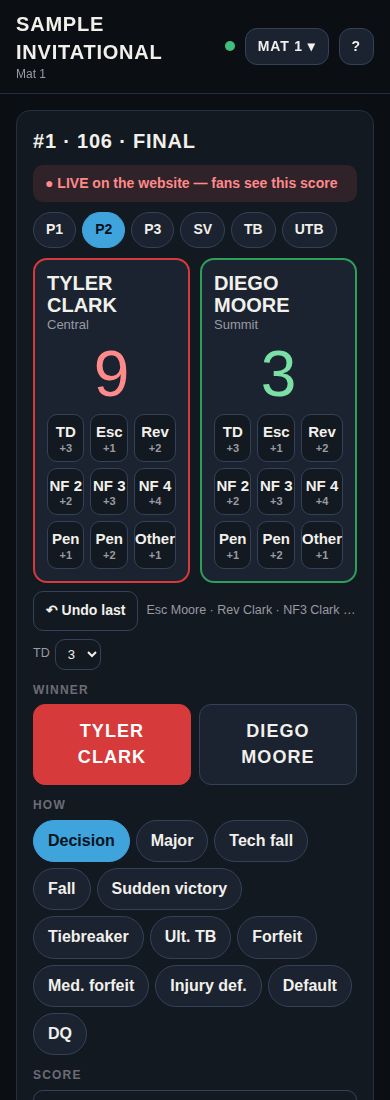
- Score each move as it happens with the buttons under the wrestler who scored: TD takedown, Esc escape, Rev reversal, NF 2 NF 3 NF 4 near fall, Pen penalty points awarded to that wrestler, Other any other point. The score adds itself up. ↶ Undo last takes back the last tap. Red is the top name, green the bottom name. Takedowns are 3 points; for youth or older rules switch TD to 2 under the buttons (the phone remembers). Every move also counts toward the team’s stats and marks the match video.
- Change the period with P1 P2 P3 (and SV / TB / UTB for overtime). Every point and period change shows on the live page within a few seconds — the red bar says ● LIVE on the website once it's sent.
- When the bout ends, check the Winner (it picks whoever is ahead — tap the other name to change it) and tap How they won. From the points it suggests Decision, Major (8+ points) or Tech fall (15+); change it if needed.
- Check the Score (like 7-3) or, for a fall, enter the Time (like 1:23).
- Tap Save result, read the summary and confirm. The next bout for your mat moves to the top.
Fix a mistake
- Right after saving: tap Undo on the message at the bottom of the screen (it stays for 90 seconds). The bout reopens so you can enter it again.
- Later: tell the tournament director. They can change any result from the director console.
- "The winner already wrestled in …" means the next bout was already scored, so the result can't be changed from the table. The director fixes it.
Other buttons
- Pull a different bout (bottom of the screen): type any bout number to score it, for example when the director moves a bout to your mat.
- Mat 1 ▾ at the top switches to another mat. ? opens this guide.
- The green dot at the top means you're connected. Red means you lost signal — finish keeping points, and save once it turns green again.
Result types
| Button | Use it when | Enter |
|---|---|---|
| Decision | Won by 1–7 points | Score |
| Major | Won by 8–14 points | Score |
| Tech fall | Won by 15+ points (bout stopped) | Score + time |
| Fall | Pin | Time |
| Sudden victory / Tiebreaker / Ult. TB | Won in overtime | Score |
| Forfeit | Opponent didn't show / didn't make weight | — |
| Med. forfeit | Opponent withdrew for medical reasons before the bout | — |
| Injury def. / Default | Opponent couldn't continue during the bout | Time |
| DQ | Opponent disqualified | Time |
For the people running itTournament directors
Everything happens in the director console. Create a director account (or sign in) and you land in it. Building, drawing brackets and a dry run of up to 10 bouts are free; each tournament costs $49 when you go live.
Before the event
- Create the tournament. Enter the name, date (and end date for two-day events), location, number of mats and whether your placers are Placers or All-Americans (it picks your results graphics), then Create tournament. It starts as Draft — hidden from the public.
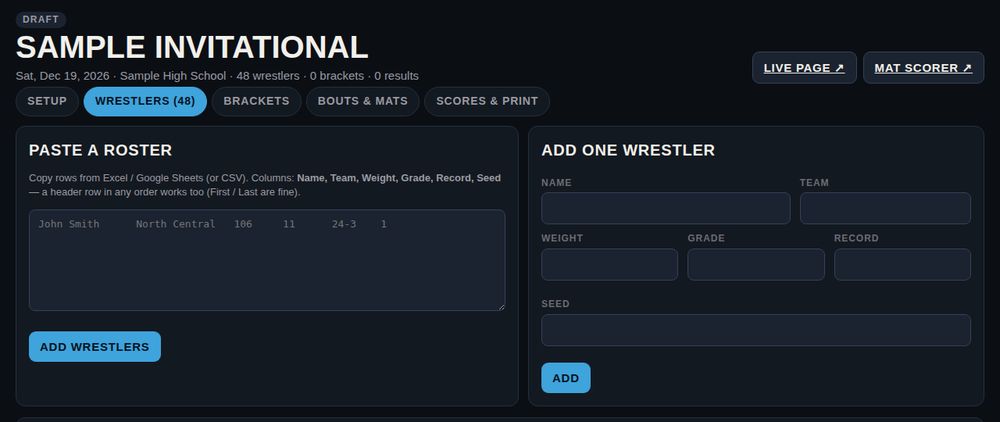
- Add wrestlers. On Wrestlers, copy the rows from your spreadsheet and paste them into Paste a roster. Columns: Name, Team, Weight, Grade, Record, Seed. A header row in any order works too, and First / Last columns are fine. Tap Add wrestlers. Use Add one wrestler or Edit for single changes.
- Seeds. Either put a number in the Seed column (1, 2, 3…) when you paste the roster, or hold a seed meeting on the Brackets tab (below). Everyone not seeded is drawn at random.
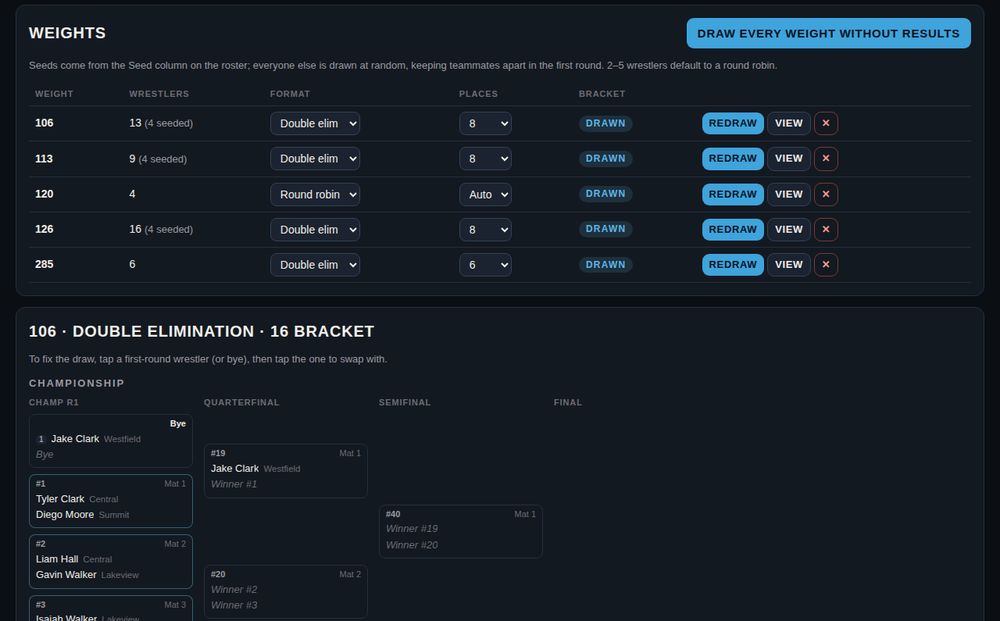
- Draw the brackets. On Brackets, check each weight's Format (Auto picks a round robin for 2–5 wrestlers, double elimination for 6+) and Places, then tap Draw every weight without results. The draw keeps teammates apart in the first round wherever it can.
- Check the draw. Tap View on a weight. To move someone, tap a first-round wrestler (or bye), then tap the one to swap with. Changed the format or added a wrestler? Tap Redraw for that weight.
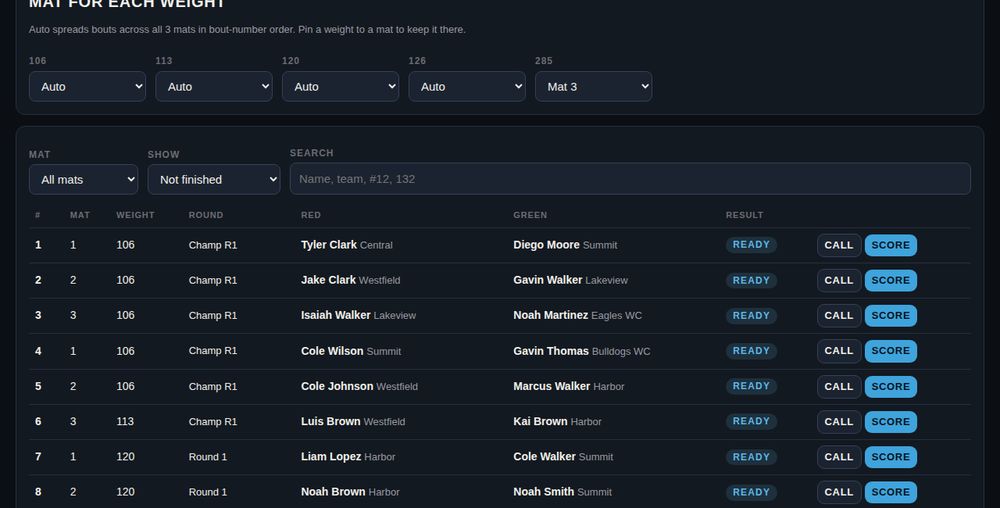
- Assign mats. On Bouts & mats, leave weights on Auto to spread bouts evenly, or pin a weight to a mat (for example, all upper weights on Mat 3).
- Share the links and PIN. On Setup you'll find the Live page link (for fans and coaches), the Mat scorer link and the Scorer PIN for the tables. Print the scorer cheat sheet for each table.
- Go live. Tap the green Go live button (or Status → Live (public)), pay $49 by card, and you're sent back with the tournament live on wardsportsmedia.com/matward.
Online registration & coach entries
Let parents and coaches enter wrestlers themselves instead of you typing rosters. Everyone uses a free MatWard account; entries land on your Wrestlers tab with an Online tag.
- Open the 📝 Registration tab. Set the entry fee (0 = free), deadline, weight classes, limits per weight and per team, whether you need a USA Wrestling card, and up to five questions (shirt size, etc.). Tick Open registration and save.
- Charging a fee? Tap Connect Stripe once and finish Stripe's sign-up. Families pay by card and the money goes straight to your own Stripe account — MatWard takes no cut. You can add the card processing fee (about 3%) to the family's total. Refunds are in your Stripe dashboard.
- Share the registration link from that tab. Parents pick Register a wrestler; coaches pick Enter my team and either fill it from their MatWard team page lineup or paste it from Trackwrestling, USA Bracketing or Excel.
- Watch entries come in on the same tab — who registered, paid or free, any missing or expired USA Wrestling cards — and download them as a CSV. Families can withdraw a wrestler until the deadline or the draw, whichever comes first.
Live video & match replays
Put a phone on a tripod at each mat and fans watch every mat live on your MatWard page, right beside the live score. Every stream is recorded, and every match can be replayed from the bracket, the results feed and each wrestler's athlete profile.
- Open the 🎥 Video tab. Tick I have the right to stream this event (wrestlers and families agreed to be filmed, and no one else holds the streaming rights) and choose Free or an Event pass with your price. Tick Show live video and save.
- Tap + Add a camera on each mat. Every camera gets a QR code and a camera link.
- On the phone that will film that mat, scan the QR code (or open the link). Install the free Larix Broadcaster app, tap Set up this phone, turn the phone sideways and tap Larix's red button. The mat shows ● Live in the console and on the tournament page.
- Fans tap Watch live on any mat. The score beside the video is held back about 20 seconds so it doesn't spoil the action before the video shows it. After a match, a ▶ on its bracket box plays just that match.
Weigh-ins
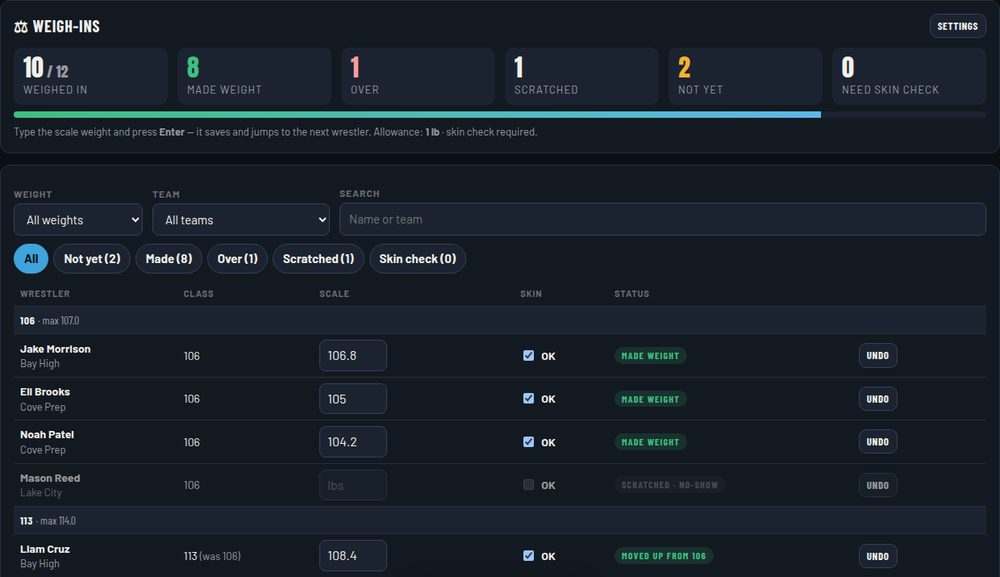
Run weigh-ins in the console on a phone, tablet or laptop at the scale. Do them before you draw, so the brackets only include wrestlers who made weight.
- Open the ⚖ Weigh-ins tab, set the allowance (for example 0, 1 or 2 lb), tick Skin check required if you want it, and tap Turn on weigh-ins. Two-day events also get a day-2 allowance (+1 lb by default).
- For each wrestler, type the scale weight and press Enter. It saves and jumps to the next wrestler. MatWard marks them Made weight, or Over with how much they're over. Filter by weight or team to work one line at a time.
- Over? Pick the class they make and tap Move up, or tap Scratch. A wrestler who doesn't show up gets No-show. Undo fixes a mistake, and moves a wrestler back to their old weight.
- When weigh-ins close, tap Scratch … not weighed in, then Go to Brackets and Draw every weight without results. Only wrestlers who made weight (and passed the skin check, if required) are drawn.
Seed meeting
Seeds can come from your roster automatically, or you can set them by hand with the coaches — whichever you prefer.
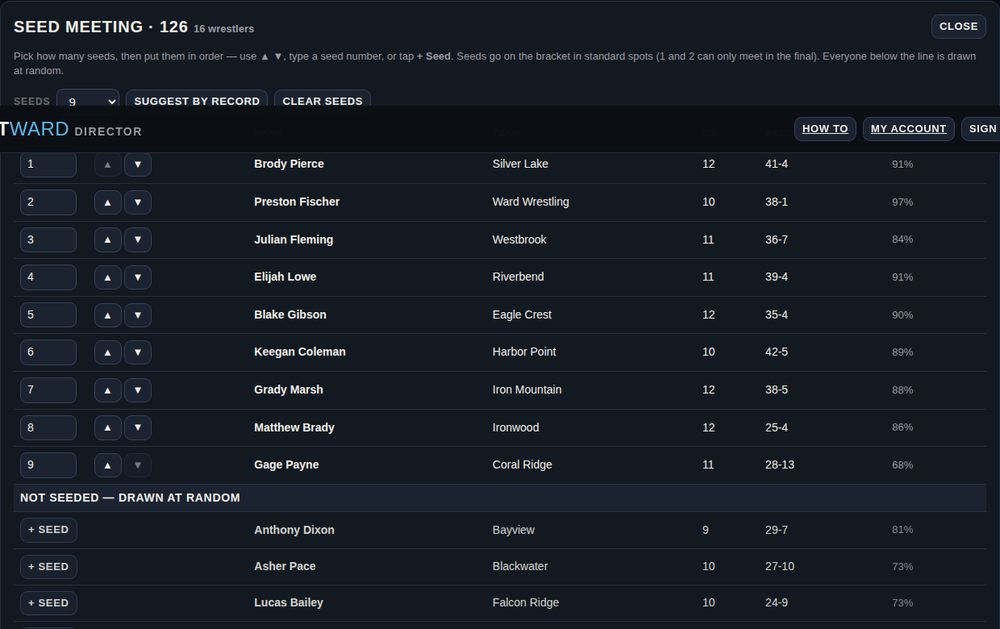
- On Brackets, tap Seed on a weight. You'll see every wrestler with team, grade, record and win %.
- Pick how many seeds (None, 2, 4, 8, 16…). Suggest by record orders everyone by win % as a starting point.
- Put the seeds in order with ▲ ▼, type a seed number, or tap + Seed on anyone below the line.
- Save seeds keeps them, or Save & draw draws that weight right away. Seeds go in the standard bracket spots, so 1 and 2 can only meet in the final.
On event day
- Bouts & mats is your control room. Filter by mat or by Ready to wrestle to see what's next, and search by name, team, weight or bout number (#12).
- Call marks a bout On the mat on the live page. Scorers do this automatically when they tap Start, and the live score shows next to it here.
- Score enters a result from the console, for example if a table's phone dies. Change fixes a wrong result. Undo removes it.
- Changing a result after the winner has already wrestled again: the console warns you and asks to confirm. Check the later bout, since it may need fixing too.
- Scratches and no-shows: score the bout as Forfeit or Med. forfeit. Don't delete the wrestler once brackets have results.
- Late addition: add the wrestler, then Redraw that weight. This only makes sense before that weight has results.
- Lost or shared PIN: Setup → New PIN. Every mat signs in again with the new one.
After the event
- Set Status to Finished. Scoring from the tables locks; you can still fix things in the console.
- On Scores & print, check team scores and placers, then use Print brackets (one weight per page) and Print placers. Choose "Save as PDF" in the print window to keep a file.
- The live page stays up with final results, so you can keep sharing the link.
- Open 🎨 Graphics to make your free results graphics (below).
Results graphics
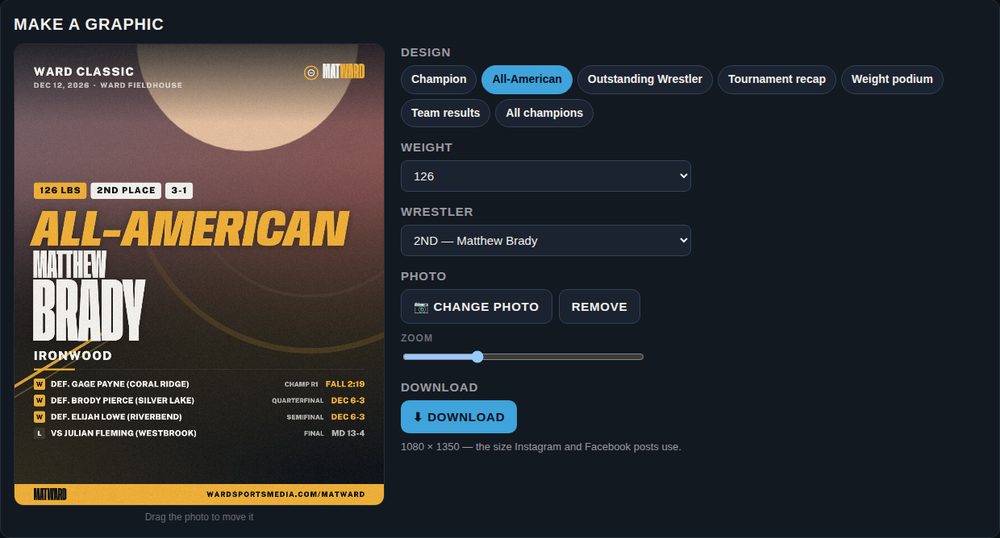
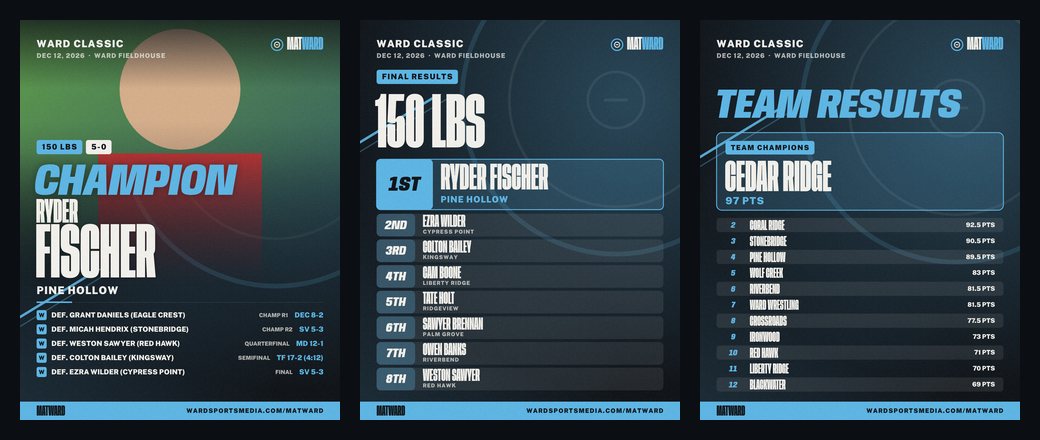
Every finished tournament gets a free set of graphics to announce results and shout out the kids. They open on the 🎨 Graphics tab when Status is Finished. Each one is 1080 × 1350 — the size Instagram and Facebook posts use.
- Champion and Placer (or All-American, if you chose All-Americans when you created the tournament) — name, team, weight, record and every match they won, with an optional photo.
- Outstanding Wrestler — pick them (and a one-line reason) in Graphics settings.
- Weight podium — 1st through 8th for one weight. Team results — team champion and standings. All champions — every weight's champion plus the Outstanding Wrestler.
- Download a whole set as a .zip: all champions, every podium, or every placer.
- Graphics settings: your colors, the Outstanding Wrestler, and Placers / All-Americans (also on Setup). Parents' graphics follow your Placers / All-Americans choice and Outstanding Wrestler pick.
For athletes, parents & coachesAthlete profiles
One page for each wrestler — results, rankings, accomplishments, videos and recruiting info — that you can share with one link.
- Create it. Sign in with a free MatWard account and tap Create a profile (or + Create profile on any wrestler in a tournament — it fills in the name, team and weight for you). Athletes 18+, parents and coaches can make profiles; one account can manage several wrestlers.
- Link MatWard results. Pick each tournament the wrestler entered on MatWard and tap their name. Every bout, place, pin, tech fall and major shows on the profile and in the totals.
- Add the rest. A photo, school and club, class, weight, season record, bio, accomplishments, results from other events, videos (YouTube, Hudl, Flo links), social handles and recruiting details.
- Rankings. Add a row per ranking. Florida wrestlers use the KABRA and FLO columns; wrestlers from other states add their state, state ranking and where it's from (for example GA · #4 · Georgia Wrestling Online). They show side by side, and the first row shows at the top of the profile.
- Choose who sees it. Public (listed in Athlete profiles), Unlisted (only people with the link) or Private (only you). Share it with the ↗ Share button.
For coachesTeam pages & season lineups
A free page for your program with each season's roster, lineup and schedule — one link for parents, fans and recruiters.
- Add your team. Sign in with a free MatWard account and tap Add your team: name, mascot, city, level, boys/girls, colors, logo and staff.
- Pick the season (for example 2025-26) and the weight classes: high school boys (106–285), high school girls (100–235), college men (125–285), college women (103–207) or your own weights. College teams pick College as the level and Men or Women.
- Roster. Add each wrestler with grade and weight, or Paste a list from a spreadsheet. Find / link connects a wrestler to their athlete profile, or + Create a profile makes one — it links to that roster spot as soon as it’s saved. Linked names on your lineup and roster open the wrestler’s profile.
- Lineup. Pick the starter and up to two backups at every weight — or tap Fill from roster weights to start from the roster.
- Schedule & results. Add duals, quads and tournaments. Enter both scores for duals (your team first) and your place for tournaments; link a tournament to its MatWard page. The dual record adds itself up.
- Share the team page, 🖨 Print lineup for the bus, or 📤 Send lineup to the other coach (copy, email or text). Your season numbers are on the 📊 Stats tab.
For coaches📊 Team stats
Every bout your wrestlers wrestle on MatWard counts on its own — tournaments, duals and dual tournaments. Matches anywhere else come in when you film them in the 🎥 Film room or a parent records them from the stands. Open your team page and tap the 📊 Stats tab (or 📊 Stats next to your team in My MatWard).
- This season. Team totals up top (record, win %, pins, tech falls and majors, bonus-point wins, takedowns for-against, first takedown), then a row for every wrestler. Tap a column heading to sort; tap a wrestler to see every bout.
- Moves. Takedowns, escapes, reversals and near falls come from bouts scored with the move buttons in the mat scorer. Bouts entered from the director console count toward the record, pins and bonus, not the moves.
- ▶ Watch. When the event had cameras on MatWard, the bout opens on the match video with a mark for every score — tap one to jump to it.
- ✎ Notes. Add a private coach note to any bout. Only you see notes.
- 🔗 Link requests. When a parent taps Send to my coach, you get an email and the request shows here. Check the roster spot it picked (or + Add to roster) and tap ✓ Link — or ✕ to decline.
- 🎥 Recorded from the stands. Matches parents record on profiles linked from your roster wait here, and you get an email when new ones come in (at most one every two hours). ▶ Watch with every score marked, then ✓ Count adds it to your season and career stats, or ✕ leaves it out. A match already counted from a MatWard bout never counts twice.
- Career. Switch to Career for every season on MatWard. Type each wrestler's wins, losses and pins from before MatWard once (Trackwrestling, your scorebook) and tap Save career records — that makes the career record and milestones right.
- 🏆 Milestone watch. Shows milestones reached this season and the ones coming up. With the email switch on, MatWard emails you when a wrestler reaches 25, 50, 75, 100… career wins (or 25, 50… pins) and when they're one away.
- 🖨 Stat sheet opens a clean page to print or save as a PDF. 📤 Send lineup (top of the team page) copies, emails or texts your lineup to the other coach.
For coaches & directorsDual meets
Dual meets are free on MatWard. Any MatWard account can run its own team's duals; directors can run any dual.
- Start a dual from your team page (+ Start a dual), from My MatWard, or from the director console. Pick your team, type the opponent (if they're on MatWard, pick them from the list) and choose the weights.
- Lineups. Your starters fill in from your team page. Type the other side's names, leave a spot empty if you don't know it yet, and tick FF when a team forfeits that weight.
- Starting weight. Tap 🎲 Random draw (or pick it). Bouts run from there up through the heaviest weight, then wrap to the lightest.
- Score. The table uses the mat scorer (Mat 1, with the PIN shown on the dual page) or taps Score on the dual page. Fans see the running team score live.
- Team points: fall, forfeit, default or DQ 6 · tech fall 5 · major decision 4 · decision 3. Add team point deductions on the dual page. A tie is broken by most bouts won, then falls/forfeits/defaults/DQs, tech falls, majors and total match points.
- Final. Set it to Final and the score goes on your MatWard team schedule and season record. Wrestlers picked from your roster get the dual on their athlete profile.
For directorsDual tournaments & multi-duals
Teams wrestle full duals — round-robin pools (a quad or multi-dual), a team bracket, or pools and then a bracket. Every bout runs on the mat scorer and the team scores, standings and bracket update live.
- Create it from the director console: + Dual tournament / multi-dual. List the teams best seed first, pick the format, the number of pools, the mats and the weights. Teams on MatWard are linked by name.
- Teams & lineups. For each team paste weight, name lines (or load the lineup from its MatWard team page). The first name at a weight is the starter; backups go underneath.
- Set up bouts. On the Duals tab tap Set up bouts — each dual gets both teams' starters. Tap a dual to change its lineup, mat, starting weight (🎲 draw), add deductions or score a bout.
- Run it. Each mat table signs in to the mat scorer with the PIN; that mat's duals come up in order. Fans follow every dual, the standings and the bracket on the live page.
- Pools, then a bracket: when the pools are done tap Build the bracket from the pools and pick how many teams advance from each pool.
- Final. Setting it to Final puts each MatWard team's place and dual record on its team page.
For youth eventsDivisions & Madison pools
Run several age groups or levels in one event, and group youth wrestlers by actual weight.
- Divisions. In Setup type the divisions (for example 8U, 10U, 12U, 14U). Weight classes then carry their division — 10U 70 — and each division gets its own brackets, bout order and team scores. Paste rosters with a Division column, or pick it when you add a wrestler.
- Madison pools. After weigh-ins, open Brackets → Madison pools, pick the division and tap Make pools. MatWard sorts by scale weight into pools of 4 (3 or 5 where needed); each pool is a round robin named for its heaviest weight.
- Adjust. Move a wrestler to another pool with the Move… menu before that pool starts.
For directorsEvent staff, gym screens & the media list
Give every worker their own code, put the mats up on the gym TVs, add a score bug to your livestream and email results to the local media.
- Staff codes. Open the 👥 Staff & screens tab (on a dual meet it's near the bottom of the page) and add each person: Head table (scores and undoes bouts on every mat), Table worker (one mat, or any mat), Announcer (sees every mat with on deck and in the hole, calls bouts and reads the script — can't score) or Team statistician (one team's next bouts, results and team score). Tap Copy invite and text it to them.
- Signing in. Staff open wardsportsmedia.com/matward/staff.html (the link is on the tab) and type their code. Table workers land on the mat scorer for their mat. The scorer PIN still works for every mat.
- Lost or shared code? Tap New code or Remove — the old code stops working right away.
- Gym screens. Open the Board link on any TV, projector or laptop and press Full screen: every mat with what's on, on deck and in the hole, plus a QR code fans can scan for the live page. A Mat screen is one giant red/green scoreboard for that mat.
- Stream overlay. In OBS, Streamlabs or vMix add a Browser source (1920 × 1080) with the mat's overlay link. It shows the bout and the live score while the mat table scores, then the winner for 10 seconds. Add &pos=br (or tr, tl, bc) to move it and &scale=1.3 to size it.
- Media list. Paste the emails of newspapers, radio and athletic directors. Send me a test first, then Send results now any time — or tick the box to send the final results automatically when you mark the event finished.
For the scorer's tableWhen the gym internet drops
The mat scorer and the head table keep working with no internet. Results save on the device and upload by themselves when it comes back.
- Sign in once while you're connected. Open the mat scorer (or the staff page) and sign in before the first bout. The page and the brackets are then kept on that phone or tablet.
- Keep scoring. If the internet drops you'll see a yellow 📴 Offline bar. Score as normal — the bracket moves ahead on your device, so the next bouts come up and can be scored too.
- Don't close the page or clear the browser while results are waiting. When the internet is back they upload in order by themselves (⟳ Uploading…), and fans see everything.
- First result in wins. If another device already scored the same bout differently, your result isn't used — you'll see a red notice, and the director (and head table) get it under ⚠ Offline results to check. Check the bout sheet and fix it there if needed.
Who needs whatAccounts & pricing
| Who | Account | Cost | What you get |
|---|---|---|---|
| Fans, parents, coaches | None needed to watch | Free | Every live page, bracket, result and team score. |
| Coaches | Free fan account | Free | Team pages — season roster, lineup (starter + backups at every weight) and schedule with results. |
| Athletes, parents, coaches | Free fan account | Free | Athlete profiles — results, rankings, accomplishments, videos, recruiting. One account can manage several wrestlers. |
| Parents | Free fan account | $9.99 per graphic | Results graphics of any wrestler once the tournament is final. Try every design free; pay only to download. |
| Fans who want more | Free fan account | Free | Follow wrestlers and whole teams, My wrestlers (on the mat / on deck / next bout and mat), alerts, and printing. |
| Tournament directors | Director account | $49 per tournament | Build, draw brackets and dry-run up to 10 bouts free. Pay when you press Go live — that opens it to the public and unlocks unlimited scoring. Includes the full set of results graphics. |
| Mat scorers | No account | — | The director's mat scorer link and 6-character PIN. |
How do I follow a wrestler?
How do alerts work?
How does a director pay?
I forgot my password.
The mathHow team scores work
Team scores follow the NFHS high school system, counted automatically from every saved result. Directors can turn team scoring off in Setup.
| Points for | How much |
|---|---|
| Advancement | 2 for each championship-bracket win, 1 for each consolation win. Placement bouts (3rd, 5th, 7th) don't add advancement. A bye counts as a win only if the wrestler wins their next bout. |
| Bonus | Major decision +1 · Tech fall +1.5 · Fall, forfeit, medical forfeit, injury default, default or DQ +2 |
| Placement | 8 places: 16, 12, 9, 7, 5, 3, 2, 1 · 6 places: 16, 12, 9, 7, 5, 3 · 4 places: 14, 10, 7, 4 |
| Round robin | 2 advancement for every win, plus bonus points. Places come from wins, then head-to-head, then falls, tech falls and majors. |
Quick answersQuestions & fixes
The live page isn't changing.
A scorer entered the wrong winner.
The scorer's phone died in the middle of a bout.
A bout says "Both wrestlers are not known yet".
We need to run a bout on a different mat.
Wrong PIN, or "Too many wrong PINs".
Can I change the draw after bouts are wrestled?
Who can see a Draft tournament?
Running a tournament?
Run it on MatWard: brackets, mat scoring from any phone, live scores and team scores for $49 per tournament. Create a director account — or, for Ward Media photo and video coverage too, email dan@wardwrestling.com or call 407-414-1137.