Program login

Enter the access code Ward Media gave your program to unlock your private templates.

Enter your code

Your credit code looks like WM-XXXX-XXXX. It was shown after checkout and emailed by Stripe.

Ward Media backgrounds
Click one to use it.
Loading…
Ward Media galleries
Pick a gallery on the left, then click a photo.
Choose a gallery to see its photos.

Game-day graphics,
ready for the sign shop.

Pick a template, add your athlete and school logo, and the design recolors itself to match your colors. Download a print-ready file or send it straight to the sign company.
1. Pick a templateSenior Night, Match Day, 100 Wins, Signing Day.
2. Add your detailsLogo, athlete, school, sport. Colors match your logo automatically.
3. Send itDownload for social or print, or email the order to the sign shop.
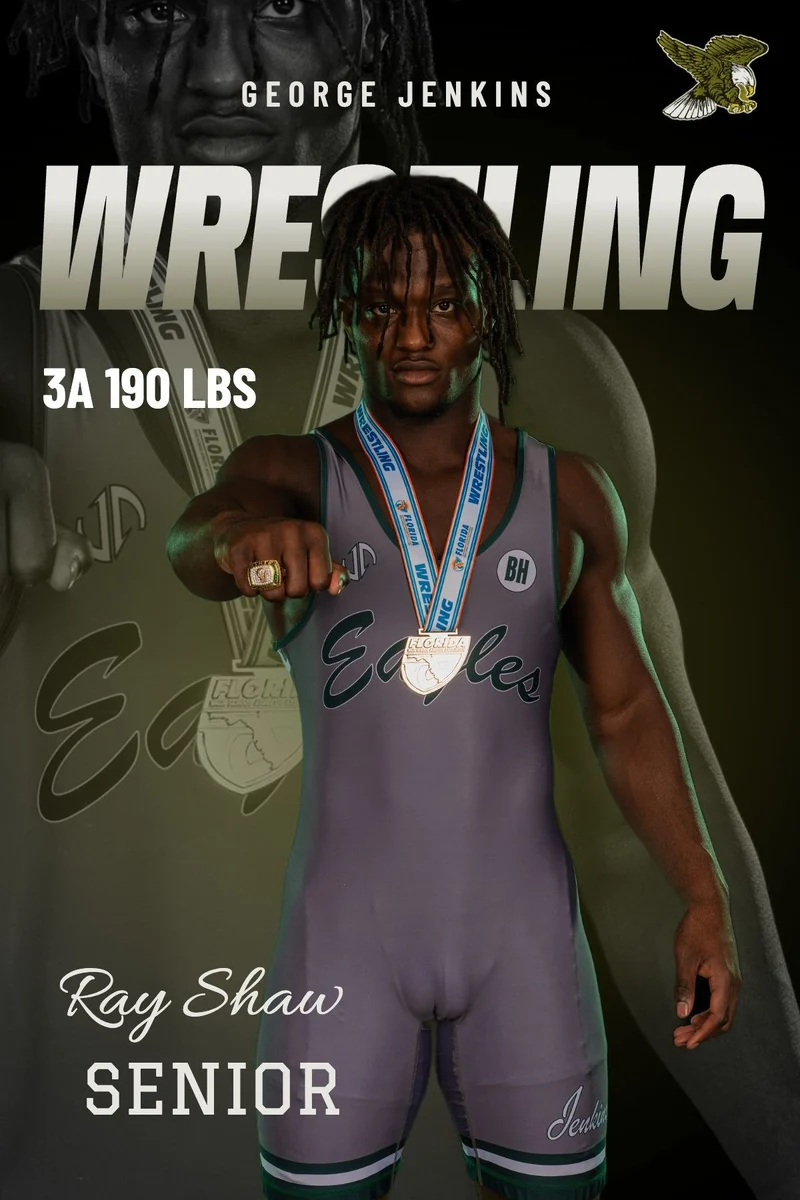
Senior poster built in the Graphic Builder — George Jenkins wrestling
Pricing
1 Graphic
$20

1 credit = 1 finished graphic, downloaded without the watermark in every size you need (social post, story, yard sign, poster). Once it's unlocked you can download that graphic again any time for free.

Best value10 Graphics
$150$15 each

10 credits to spend on any 10 graphics — one credit per finished design, so you can mix templates, athletes and events all season. You don't have to use them now: credits never expire and work on any device with your code.

Custom Graphic
$150

Designed by Ward Media from your photos and details — a one-of-a-kind piece, not a template. Contact for details.

Contact for details

Try every template free — the preview carries a watermark. A credit is used only when you download or email a finished graphic. After that the graphic is unlocked for good: download it again in any size at no extra cost. Changing the name, photo, details or template makes a new graphic (1 credit). Already have a code?

💡 How to make your graphic
  1. Click a design you like below, then tap Customize this template.
  2. Add your details — school logo, athlete name, school, sport and year. Colors match your logo automatically.
  3. Adjust the athlete to fit — tap the athlete on the preview, then drag to move and use the Size slider to resize.
  4. Download or print — tap Looks good, pick a size, then Download PNG or Order print.
Free to try — the preview has a watermark until it's unlocked. Full how-to guide →
Choose a template
💡 Customize & fit your athlete
  1. Fill in the left side — logo, athlete name, school and details. The preview updates as you type.
  2. Tap the athlete on the preview to select them. Drag to move, and use the Size slider (or scroll) to make them bigger or smaller.
  3. Background: athlete photos have their background removed for you. With the athlete selected, untick Remove background to use the whole photo.
  4. Tap any text or logo to move or resize it too. Reset position puts it back. Happy? Tap Looks good — next.
Changed your mind on the design? Tap Change template — your details stay. Full how-to guide →
School logo
Primary
Accent
Base
Athlete
Template details
Size
Add
Adjust Tap an item to select it · drag or use the arrows to move · scroll or slider to resize · pick hard-to-grab items (Ghost, Background) from the list
Preview · exports at full resolution
Choose a size
Preview

Order summary

Pay by card on the next screen (Stripe). Your print-ready file and order go straight to the sign shop, Ward Media is copied, and you get a receipt by email. The total is the graphic + the print + shipping (the graphic is included when you already unlocked it or hold a credit).

Studio settings
Sign company

Saved on this device only. To change the default for everyone, update the SIGN_COMPANY values at the top of the page script.